

Galactic Ideas installs the Yoast SEO plugin on every WordPress website we develop. We configure the plugin during launch, but as new pages, posts, portfolio items, or documents are added to the website, it is important to complete the basic SEO fields so search engines can better understand the content.
The guide below explains what Yoast SEO helps with, which fields are most important, and where to learn more about improving your website’s visibility in search results.
What Yoast SEO helps with
Yoast SEO is a WordPress plugin that helps improve how your website content is structured for search engines. It does not automatically guarantee higher rankings, but it provides helpful tools and recommendations for making each page or post easier for search engines to understand.
Yoast allows you to add important search-related information, such as an SEO Title, Focus Keyphrase, and Meta Description. These fields help clarify what the page is about and can influence how your content appears in search results.
The plugin also provides readability and SEO feedback as you edit content, giving you a general sense of whether your page is well-structured, easy to understand, and using your target keyphrase in helpful places.
The plugin also provides readability and SEO feedback as you edit content, giving you a general sense of whether your page is well-structured, easy to understand, and using your target keyphrase in helpful places.
How to use Yoast SEO when adding or editing content
When adding new pages or posts, we recommend completing the basic Yoast SEO fields before publishing. At a minimum, this includes adding a Focus Keyphrase and Meta Description.
The Focus Keyphrase is the main phrase you want the page or post to be associated with in search results. This could be a service, product, project, client name, industry, location, or another phrase someone might realistically search for.
The Meta Description is the short summary that may appear below the page title in Google search results. It should briefly explain what the page or post is about and encourage people to click through to the website.
Yoast also includes optional fields for synonyms and additional keyphrases, which can be used for related terms or alternate ways someone might search for the same content.
Within the SEO Title and Meta Description fields, Yoast provides a color meter that gives general feedback on whether the length and structure are in a good range for search results. Green is ideal, but not every page or post will reach a perfect score. For example, portfolio posts or image-heavy pages with limited body copy may stay orange even after the basic SEO fields are completed.
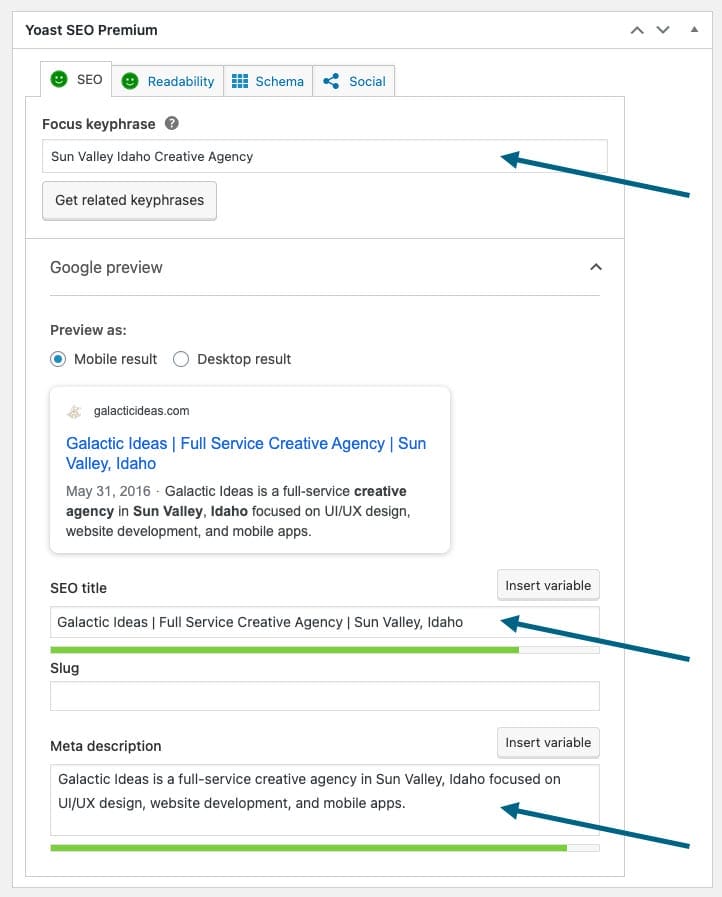
The Premium SEO Analysis provides additional feedback and optimization suggestions beyond the basic SEO checks. This can include insights related to synonyms, related keyphrases, internal linking opportunities, and other improvements that help strengthen the page or post.
For more detailed instructions, please review Yoast’s beginner guide below: The beginner’s guide to Yoast SEO